
tweet

How to Use TweetDeck

TweetDeck Screenshot Need an easy platform or management tool to help you juggle multiple Twitter accounts at the same time? Try TweetDeck by Twitter. No only does it make it easy to multitask, but there are options to schedule tweets and track multiple keywords/hashtags, etc.

TweetDeck has a new version which boasts a better layout and backend framework that is truly derived from the Internet. Now, you can access TD through multiple browsers including Firefox and Google Chrome and can be obtained for Windows 7 or OS X (versus only limited options previously).

Want a log in right now? Head to http://web.tweetdeck.com to start your own account.

Getting Started:

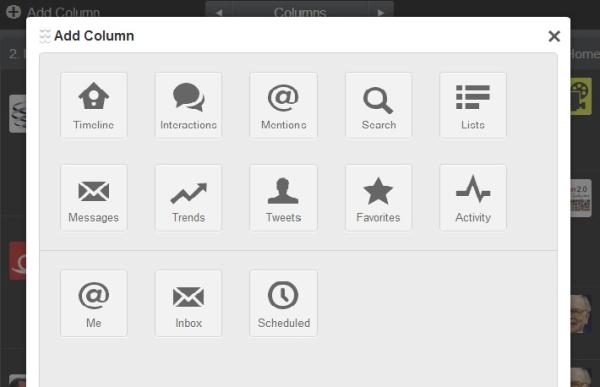
As soon as you've created your own log in, you can add multiple Twitter accounts to the dashboard by clicking on the (+) Add Column button at the top of the screen. Each column on the dashboard will keep one feed of information visible and will be set based on your own preferences. We prefer to keep columns like the Timeline (similar to the typical Twitter newsfeed you see at Twitter.com), Interactions (to see who has recently mentioned us), Messages (to track direct/private messages) and several unique #'s to make sure that we're staying up to date with current conversations that are happening around us.

Scheduling a Tweet

The best part about TweetDeck is the ability to schedule updates at specific times. This function will allow you to queue up your tweets for the upcoming day or week (or month), so that you have time to do other important things! Keep in mind: We don't recommend scheduling tweets too far in the future as you still want your content to remain relevant with your audience.

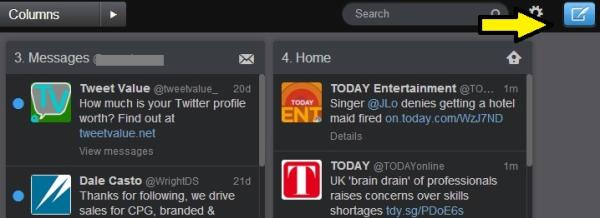
To schedule a tweet, simply click the blue icon in the upper right (or left) hand corner which will let type out your tweet and subsequently, change the future posting settings. Be sure to double check the date and time of your intended scheduled tweet before clicking the "Tweet" button to set the tweet.

TIP: Add another column to your dashboard that contains future tweets. This way, you'll be able to easily delete, add or change scheduled tweets.
And there you have it! A simple platform to use to help manage all of those interesting accounts that you're using -- or following! We use TD daily and believe that it helps us stay up to date with the hottest conversations taking place around the world and more easily allows us to tweet succinctly and successfully to our target audience(s).

Tell us: What management system do you use to organize your social accounts?

Samantha & Mike


Twitter To Go Public

screen shot 2013-09-12 at 5.06.07 pm With the Twitter IPO looming, many are wondering what the ramifications will be to the user experience. According to analysts, not much will change. One of Twitter's greatest attributes has always been a positive user experience. The platform is clean and simple, and has been that way since day one. Unlike Facebook, who is constantly redesigning and overhauling their interface, user's have always been able to count on the Twitter they know and love.

Now that we have been reassured our day-to-day experience will not change much after the IPO, lets find out what will be different:

To begin, Twitter will most likely expand its international presence, specifically in Latin America and southeast Asia. This will be more of a behind-the-scenes type of change, so users will almost certainly not notice an impact on their experience. The next thing that Twitter's 240 million monthly active users may notice is an increase in new features and partnerships, for example shopping. Twitter recently hired the former president of Ticketmaster, Nathan Hubbard, to reportedly help bring a better shopping feature to the Twitter feed. This has the potential to be a HUGE change to the Twitter platform and online commerce as a whole. After all, how many times have you seen something on Twitter that you wanted to buy? If Nathan and Twitter can figure out a way to seamlessly integrate this feature, it could certainly be a game changer!

So, will Twitter continue to keep the user experience its number one priority post IPO? Only time will tell. We believe Twitter has always done a great job of adding thoughtful and useful features that actually enhance user experience, rather than just add revenue to the bottom line. We're excited to see what Twitter has in store for us. Of course, we will probably see more advertising one way or the other, but we have confidence that Twitter will do so in the least obtrusive way possible.

Which way do you think Twitter will go? Will they sacrifice user experience for marketing dollars or stay true to their user first ideals?

- Mike & Samantha

Esquire's 9/11 Social Media Fail

9/11. No matter where you were in the world, people took a moment (or more) to reflect on the terrible events that took place 12 years ago. And when it came to social media, many brands decided to run their own relevant stories or 'thoughts and prayers' for all of those involved. Others decided to go "dark" and not post any content in honor and remembrance of the lives lost on that fateful day. However, not everyone handled the situation with poise, including several large brands like AT&T and Esquire Magazine. Specifically speaking, the social media 'fail' that came from the popular men's magazine, Esquire, was the apparent mistake of running a story of the infamous 'falling man' from 9/11 -- next to copy that read "Make your morning commute more stylish: Look good on your way to work."

Esquire Magazine Screenshot

Almost immediately, people took to Twitter to show their anger for the insensitivity of the magazine's layout. Fortunately, the brand responded with an apology for the editorial mess-up. Unfortunately, the brand did so in a manner that enraged fans even more.

Esquire Magazine Apology Tweet

Although I'm only an opinion of one, I think this was a very inappropriate way to respond to those who were upset. By using the word relax, Esquire implied that the Twitter community was overreacting. Instead, I would've recommended genuinely owning up to the mistake, making sure to leave all "judgmental" statements to the side.  Even though an apology was included in the tweet, the impact of it was lessened by the lead-in.

Sadly, this type of insincere communication happens all of the time on social media between brands and their communities. Whether it's copy that could be easily misinterpreted or content that comes across too promotional in the wake of a tragedy, brands must be 100% aware of what reactions could come about from fans and what to appropriately say in the case that things do go awry.

As a former community manager for several major consumer brands, my team and I handled PR crises with much more sensitivity, as we knew how quickly brand loyalty could be washed away in a blink of an eye with one wrong or insensitive response. I hope that the community manager in charge of the tweet learned from this mistake and will do better in the future. I also hope that the team behind the magazine's digital strategy will put in a better checks and balances strategy in times of high sensitivity, so a simple reactionary tweet like "Relax, everybody" will be reviewed before going live in the future.

-- Samantha

DO's & DON'Ts for Community Managers

Community managers have created a true strategy for word-of-mouth marketing, but there are certainly rules to this type of work. Those that follow them can successfully grow their brand. Those that don't, can wind up in a boatload of customer service trouble -- and much faster than you think thanks to socially savvy consumers. Originally, community management was done by young interns, who did not have the full ability to run a brand online. A study completed by Social Fresh in 2013 stated that the average age of community managers has increased to those in their 30s. Additionally, the pay has increased to an average of $60k which competes with many mid-level jobs within the marketing industry. (See below for a infographic from Social Fresh for more details!)

Having said this, the last few years of experience have evolved community managers into a true voice behind a company. With every post and tweet, they represent the business and should embody its exact personality and tone. When one has this much power and those on the outskirts are watching, it's imperative that a CM's actions 100% reflect the brand's messaging and beliefs to create a seamless extension of the business throughout the online space.

Community managers must be creative, flexible and willing to go above and beyond. Most importantly, CMs must be consistent. And because they're "virtually visible," they automatically gain more responsibility. Everyone (customers, competitors, etc.) online can see their responses 24/7.

Here are some general DOs & DON'Ts for community managers:

DOs:

  • Be an expert of your company (or product).
  • Monitor, consistently.
  • Encourage engagement by genuinely interacting with fans.
  • Respond in a timely manner.
  • Be a friendly, approachable personality!
  • Listen to your fans and build relationships.
  • Don't be afraid to take some conversations offline to better help a fan.
  • Truly resolve issues with the greater team to build a loyal community.
  • Thank your fans and show appreciation!

DON'Ts:

  • Be rude, sarcastic or defensive.
  • Delete comments, posts, tweets, etc.
  • Ignore people who are asking for help or answers!
  • Be ambiguous with your responses to fans.
  • Respond too quickly to those who may detract from your brand.
  • Use your social presence to blatantly 'push' products or services.

Comment below to add any DO's & DON'Ts that I may have missed!

-- Samantha

Community Manager Report 2013

Why People Overshare Online

Status Update on Facebook We all have the friends on Facebook or Twitter who overshare the details of their lives with the rest of the internet. They're the type of people who consistently update statuses and feel the need to share every detail of their lives -- from what they last ate for lunch to their opinion of their favorite TV show. Although it's certainly their right, what makes it so easy to overshare on social media platforms?

Author and social scientist, Sherry Turkle, believes after one shares feelings or thoughts in a public space, the brain's neurochemical reward system is automatically triggered. This action, in addition to the idea that our private lives are constantly being infiltrated by reality TV and social media, adds to an innate urge to share.

In the most recent paper by Russell W. Belk titled "Extended Self in a Digital World," he argues that people's relationships with social media sites are ultimately allowing us to create a more complicated concept of who we believe we are as individuals. With the addition of various platforms that let us be creative through status updates, highly-edited pictures and funny videos, Belk says that humans are able to create a unique, desired identity in a space that makes us feel 'invisible.' Consequently, when individuals believe no one is listening or watching behind a screen, they gain more confidence to divulge personal details about their lives that wouldn't typically be shared in normal day to day life.

Overall, it's clear that the line between private and public is quickly disappearing with each status, tweet and Instagrammed photo. People want to be interesting, popular and cool. They want to be heard and respected -- and will often give up such self-respect to feel valued by their peers. But how far is too far? And how much worse will it get as our world continues to highlight reality stardom and materialistic values?

Tell us: How much do you share via social media? 

-- Samantha

The US Open Goes Social

The US Open is one of the oldest tennis tournaments in the world. Every late August & early September, it draws the league's top players and thousands upon thousands of fans. This year, the US Open (hosted in New York) will be accompanied by a brand new attraction: a 50-feet-by-8-feet social media wall that will aggregate all social content made by fans and players in real-time. Although the content will be monitored, fans will be able to send tweets, Instagrammed pics and more to better connect themselves to this world-famous event, using the official hashtag #usopen. It will also serve as a meeting spot for the over 700,000 attendees expected to be at the tournament.

US Open Social Media Wall

We think this is an amazing idea as it encourages tennis fans to engage with the US Open and with the sport of tennis in general. In fact, we love this social media wall so much that perhaps it should be rolled out to more sporting events in the future to help increase awareness for a particular team or brand partnership. Just think: Tens of thousands of fans at a baseball or football event would be able to watch a screen displaying not only the score, but a ticker or 'wall' of the latest social conversations taking place around the game. Fans would be able to view and engage with the current dialogue between team members, fans and even brands, therefore adding a truly personal experience to the event.

And although we've seen this at some basketball and hockey games by way of a social 'ticker' or half-time entertainment on the big screen, such a staple at every game would result in an automatic uptick in engagement numbers throughout a season. With more engagement comes better brand or team awareness, ultimately resulting in a higher interest in the game, more stadium tickets sold and better customers for those sponsored brands involved.

As huge sports and social media fans, we're big supporters of a roll-out of this nature. Are you?

-- Samantha & Mike